Chrome Flag : Allow Insecure Localhost
Allow Insecure Localhost : In today’s digital era, web development has become an integral part of businesses and individuals alike. With the ever-growing demand for websites and web applications, developers are constantly seeking ways to streamline their development process and enhance productivity. One such tool that has revolutionized web development is Google Chrome, with its plethora of features and functionalities, including Chrome Flags.
Chrome Flags are experimental features and settings that allow users to customize and enhance their browsing experience. Among these flags is the “Allow Insecure Localhost” flag, which can be a game-changer for developers working on local development environments.
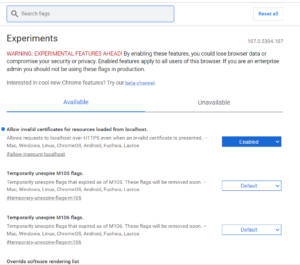
What is “Allow Insecure Localhost”?
The “Allow Insecure Localhost” Chrome flag is designed to bypass the HTTPS requirement for localhost connections. In other words, it allows developers to access local development servers over HTTP, even if the servers are configured to use HTTPS by default. This can be incredibly useful during the development phase, as it eliminates the need to set up SSL certificates for local development environments.
Enabling “Allow Insecure Localhost”
Enabling the “Allow Insecure Localhost” flag is a straightforward process:
- Open Google Chrome browser on your computer.
- In the address bar, type
chrome://flagsand press Enter. - This will take you to the Chrome Flags page, where you can find various experimental features.
- Use the search bar at the top to find the “Allow Insecure Localhost” flag.
- Click on the dropdown menu next to the flag and select “Enabled.”
- Finally, click on the “Relaunch” button at the bottom of the page to apply the changes.
Benefits of Using “Allow Insecure Localhost”
Simplified Development Workflow
By allowing connections to localhost over HTTP, developers can streamline their development workflow. They no longer need to generate or install SSL certificates for their local development servers, saving time and effort.
Seamless Testing and Debugging
With “Allow Insecure Localhost” enabled, developers can seamlessly test and debug their web applications in a local environment without encountering HTTPS-related issues. This facilitates faster iteration and debugging cycles, leading to quicker development.
Compatibility with Third-Party Tools
Some third-party tools and libraries may not support HTTPS connections to localhost by default. Enabling the “Allow Insecure Localhost” flag ensures compatibility with such tools, allowing developers to leverage their full potential without any limitations.
Important Considerations
While the “Allow Insecure Localhost” flag offers numerous benefits for developers, it’s essential to exercise caution when using it:
- Security Implications: Keep in mind that bypassing HTTPS for localhost connections can pose security risks, especially if sensitive data is involved. Exercise caution and avoid transmitting confidential information over insecure connections.
- Limited to Localhost: The “Allow Insecure Localhost” flag only affects connections to localhost (127.0.0.1). It does not impact external websites or connections to remote servers.
Conclusion
In conclusion, the “Allow Insecure Localhost” Chrome flag is a valuable tool for developers seeking to streamline their local development workflow. By enabling this flag, developers can bypass HTTPS requirements for localhost connections, thereby simplifying testing, debugging, and compatibility with third-party tools. However, it’s crucial to balance the benefits of convenience with security considerations and use this feature judiciously in development environments.
Leave a Comment (0)
No comments yet
Be the first to comment!